FMIS
A connected Financial Management & Information System for finance, budgets, payroll, contracts, and reporting.
Explore FMISMeet FMIS. A connected Financial Management & Information System for the people managing projects, budgets, and everyday decisions.
Finance to reporting. Connected from the start.
Purpose-built for complex financial operations
PROJECT MANAGEMENT OFFICESPUBLIC SECTOR PROGRAMSGROWING ORGANIZATIONSExplore Binary Bitz products for financial management and legal practice.
A connected Financial Management & Information System for finance, budgets, payroll, contracts, and reporting.
Explore FMISManage cases, hearing dates, fees, and supporting documents in a mobile diary built for legal professionals.
Explore Counsel DiaryMove beyond disconnected spreadsheets. Bring your teams and financial information into a shared workflow.
Manage financial records and payments with the context your finance team needs.
Understand budgets, releases, expenditure, and commitments without gathering figures from separate teams.
Align access and approval stages with your organization’s responsibilities and internal processes.
Bring financial transactions, contracts, and supporting documents together for easier review and reporting.
Binary Bitz combines product development and implementation support to shape FMIS around your operational needs.
Map your financial processes, reporting requirements, and team responsibilities.
Set up the modules, financial structure, access roles, and approval stages you need.
Plan data preparation and train your team on the workflows they use every day.
Keep improving through ongoing support and requirements-led enhancements.
Keep your legal practice close at hand. Register cases with contact links, prepare for hearings, record fees, call the right person, and share selected case information and attachments.
Case records · Contact links · PDF reports · WhatsApp sharing
Search case records, browse the hearing calendar, and plan the next hearing.
Record payments, monitor outstanding balances, and attach payment proof.
Keep case files, photos, hearing minutes, and audio notes together.
Set hearing reminders, lock the app, and back up or export your records.
Link party and advocate contacts during registration, then call the respective person from the case view.
Choose the information to include in PDF reports or WhatsApp messages, with print and attachment options.
Explore the app’s screens. Select any screenshot to see it in detail.
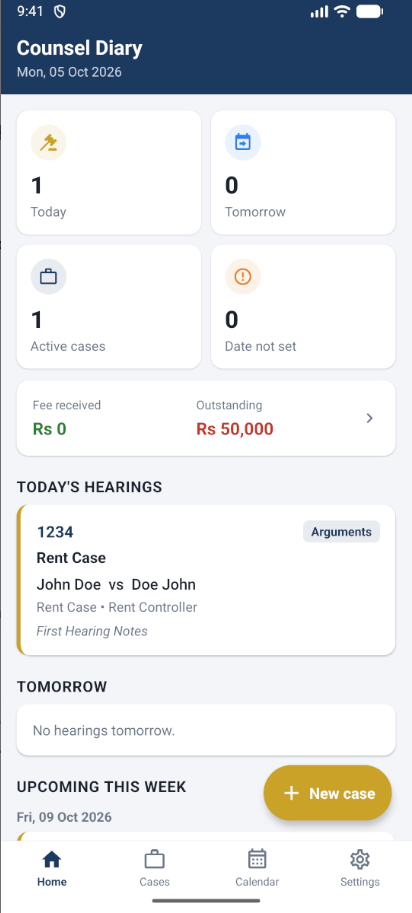
See today’s hearings with party names and notes, tomorrow’s schedule, upcoming hearings this week, and fee balances.
Search by title, case number, FIR, party, or court, and filter your case list.
Browse hearing dates in a monthly calendar and inspect the day’s cases.
Configure morning and evening hearing reminders and maintain reference lists.
Use PIN or fingerprint app locking, ZIP backup and restore, and case exports.
Attach photos, documents, and voice recordings to your case records.
Save hearing minutes, supporting files, the next date, and hearing purpose.
Track received and outstanding fees, payment notes, and receipt attachments.
Record the client, adverse party, and advocate details, with links to your phone contacts.
View the case and call or message the client, adverse party, or advocate from their contact details.
Select case details and parties, hearings, fees, and documents before sharing or printing.
Preview your PDF case report and choose printer, paper size, and copies.
Select case details, hearings, and fees to share on WhatsApp, with an option to include attachments.
Bring more order to your practice.
Ask us about Counsel Diary App.
Tell us about your organization and the challenges you want to solve. Ask about FMIS or Counsel Diary App, and tell us what matters to your team.